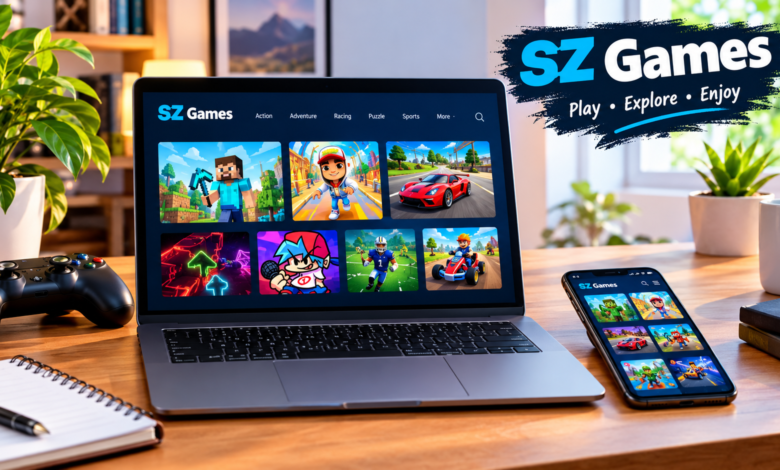
SZ Games is a free online platform that lets people play browser games right away. You open a webpage, pick a title, and start without installing software or creating an account. Many versions run on GitHub Pages under addresses such as sz-games.github.io. Students, casual players, and anyone with a few free minutes use it for quick sessions on Chromebooks, laptops, or phones.
What Is SZ Games?
SZ Games collects HTML5 games that load inside a normal web browser. The purpose is straightforward: give access to short, playable titles without the usual barriers of downloads or logins. A player visits the page, sees a grid or list of games, and clicks one. The game then runs using the browser’s own tools.
On a typical visit the page shows thumbnails for action, racing, puzzle, and arcade games. Some versions highlight popular picks near the top. Others add a search bar or simple category buttons. Because the games stay inside the browser, they work on most devices that can open a modern webpage. School networks that block regular game sites often still allow these pages, which explains why many students look for them during free periods.
Anyone with an internet connection and a current browser can use the platform. No special hardware is required. A basic Chromebook or older laptop handles most of the titles without trouble.
How Does SZ Games Work?
You reach the site by typing a known address or finding it through search. Once the page loads, you scroll or search for a game you want. Clicking the title opens it in the same window or a new tab. From that point the game responds to keyboard, mouse, or touch input depending on the device and the title itself.
Browser-based play means the code runs on your device through the browser. Nothing installs permanently. If the connection drops or the tab closes, the session ends. Most games start in a few seconds on an average connection. Slower networks may take longer to load the first screen, but once running they usually stay responsive.
Key Features of SZ Games
Free online games and direct browser access form the main draw. You do not pay to play the standard library, and you skip the step of downloading files. A search box or category filters appear on many versions so you can narrow the list quickly. Keyboard and mouse controls work for desktop titles, while touch controls handle mobile versions of the same games.
The pages stay light. They avoid heavy animations or complex menus that would slow older devices. This keeps the focus on choosing a game and starting it.
What Types of Games Are Available on SZ Games?
The collection covers several styles, though the exact list changes from one hosting page to another.
Action and Adventure Games
Action and adventure titles test timing, movement, and quick decisions. Endless runners, short platformers, and simple exploration games appear often. A player might guide a character through obstacles or react to sudden changes on screen. These sessions usually last only a few minutes, which suits short breaks.
Racing and Driving Games
Racing and driving games put the focus on speed and path control. You steer a ball, car, or other object along a track while avoiding walls or gaps. Difficulty rises as the pace increases. Most of these titles use arrow keys or simple swipe gestures and run smoothly on modest hardware.
Popular Games to Explore on SZ Games
Certain titles show up across many versions of the platform and draw the most clicks.
Slope asks you to roll a ball down a shifting 3D track. Speed builds steadily, and one missed gap ends the run. The neon look and constant motion make it a frequent first choice.
Subway Surfers places you on train tracks where you dodge cars, jump barriers, and grab coins. The browser version keeps the bright colors and familiar left-right controls.
Retro Bowl lets you manage a football team and call plays in short matches. The pixel style and simple season structure appeal to players who want something longer than a pure reflex game.
Smash Karts drops players into multiplayer kart races filled with power-ups. Matches move fast and work well when a few friends join the same lobby.
Friday Night Funkin’ is a rhythm challenge. You hit notes in time with the music using arrow keys or the matching buttons on screen.
Versions labeled sz games minecraft offer simplified building or exploration experiences that echo the open-world style of the original without requiring the full desktop client. Similarly, sz games fnaf pages host lighter horror or jump-scare games inspired by the Five Nights series. These run in the browser and keep the core idea of watching cameras or reacting to sudden events.
When picking a game, match it to your device. Keyboard-focused titles feel better on a laptop. Touch-friendly ones suit phones. Glance at the controls listed on the game page before you start so you know what to expect.
How to Play SZ Games on Different Devices
Playing SZ Games on a PC or Laptop
Open Chrome, Edge, or Firefox. Go to a verified page, choose a game, and use the keyboard or mouse. Full-screen mode helps on larger monitors. Closing extra tabs frees memory and reduces lag. An updated browser handles the HTML5 code more reliably than an older one.
Playing SZ Games on Android Phones
Most Android browsers open the same pages. Select a game and use touch controls where the title supports them. Landscape mode often gives a better view. A steady Wi-Fi or data connection shortens load times. Some games feel cramped on small screens, so longer sessions work better on a tablet if one is available.
Is SZ Games Safe to Use?
Many pages state they collect no personal details and require no login. That lowers one common risk. Still, free game sites often display advertisements. Those ads can open new tabs, show pop-ups, or lead to unrelated pages. Clicking them without checking the destination can expose a device to unwanted downloads or tracking scripts.
Browser permissions matter. A legitimate game page rarely asks for camera, microphone, or location access. If a site requests those, close it. Keep the browser’s pop-up blocker turned on and avoid granting notification rights unless you deliberately want them.
For children and students the same rules apply with extra care. An adult should review the page first, note any aggressive ads, and remind younger users never to enter names, emails, or passwords. School devices already carry network filters; staying within free periods and reporting odd behavior keeps the experience cleaner.
Evaluating security starts with the address bar. Look for the padlock that shows HTTPS. Read the domain carefully. Pages that flood the screen with warnings or demand software installs are best left alone.
Is SZ Games Legit or a Scam?
The platform is not a single company product with one official headquarters. Several independent pages use similar names and share overlapping game lists. A page is more trustworthy when it loads games without asking for money, personal data, or forced downloads. Aggressive language about prizes, viruses, or limited-time offers usually signals a low-quality or risky site.
Check the domain spelling and the overall look of the page. Consistent design, working game links, and the absence of sudden payment requests are practical signs of a usable version. If anything feels off, close the tab and try a different known address.
Official SZ Games Website: How to Find the Right Domain
Multiple domains host similar content. One common form is sz-games.github.io. Others use short variations of “szgames” with different endings. Typing the address exactly and bookmarking a working page once you confirm it helps. Search results sometimes push look-alike sites that load extra ads or request downloads. Comparing the address bar against a previously successful visit is the simplest way to stay on a familiar page.
Imitation sites often copy the layout but change the domain slightly or add urgent pop-ups. Leaving those pages quickly limits exposure.
Advantages and Limitations of SZ Games
Advantages of Using SZ Games
You reach the games with one click and no installation. Storage stays free, and older devices can still run most titles. The mix of categories gives options for different moods and time slots. Short sessions fit easily into a study break or lunch hour.
Limitations appear as well. The library is smaller and less polished than paid platforms. Ads interrupt some sessions. Performance depends on the specific game and the device’s free memory. Because different people host similar pages, features and ad levels vary. A page that works well one week may change later.
SZ Games vs. Other Free Online Gaming Websites
Game selection on SZ Games centers on titles that load fast and need little setup. Other free sites may offer larger catalogs or stronger filters against ads. Device compatibility is similar across most browser platforms; the real difference shows in how cleanly the page loads and how many interruptions appear.
Safety practices differ by site. Pages that avoid data requests and keep ads in the background feel more comfortable for repeated use. The factors that matter most are clear loading, minimal personal-data demands, and predictable controls. Players who value speed and zero installation often stay with a familiar SZ Games address once they find one that stays stable.
Common SZ Games Problems and How to Fix Them
SZ Games Not Loading
First confirm the internet connection. Switch browsers or clear the site’s cache and cookies. School or workplace filters sometimes block one domain while allowing another. Trying a second known address or waiting for a less restricted network solves many cases. An outdated browser can also prevent the page from opening correctly.
Games Running Slowly or Lagging
Too many open tabs or limited device memory usually cause the slowdown. Close unused tabs, restart the browser, and choose simpler 2D games if a 3D title struggles. A stronger connection reduces the chance of stuttering after the game starts.
Games Not Working on a Chromebook
Chromebooks rely entirely on the browser. Update it and make sure JavaScript is enabled. Managed school devices may restrict certain addresses; switching to another verified page or playing outside peak filter times often restores access. Once the game loads, keyboard and touch controls function as they do on other devices.
Tips for a Better Experience on SZ Games
Keep the browser current so HTML5 code runs with fewer errors. Close tabs you do not need. Read the control notes on the game page before the first attempt. Lower volume and good lighting reduce strain during longer play. If ads become distracting, a standard ad blocker can help, provided it does not break the game itself.
Final Thoughts on SZ Games
SZ Games gives quick access to free browser games without the steps of downloading or signing up. The library includes familiar titles and lighter versions of better-known series such as those found under sz games minecraft and sz games fnaf labels. Safety depends on choosing a clean page, ignoring suspicious ads, and keeping personal details private. Device performance and network conditions affect the experience more than any single feature. Players who verify the address, watch for unusual requests, and match games to their hardware usually find short, workable sessions.
Frequently Asked Questions About SZ Games
What Is SZ Games Used For?
People use SZ Games to play short browser games during free time. The platform suits study breaks, lunch periods, or casual moments at home when no installation is wanted.
Is SZ Games Free to Play?
Yes. The standard games load and run without payment. Advertisements on the hosting pages support the free access.
Do You Need to Download Anything to Play SZ Games?
No. Everything runs inside the browser. No separate files install on the device.
Is SZ Games Safe for Kids?
With adult oversight it can be. Pages that skip logins reduce one risk. Parents should still check for heavy ads, keep pop-up blockers active, and choose age-suitable titles. Younger users should never enter personal information.
Can You Play SZ Games on a Chromebook?
Yes. Chromebooks open the same browser games. An updated browser and an accessible domain are the main requirements. Keyboard and touch controls both work once the title loads.