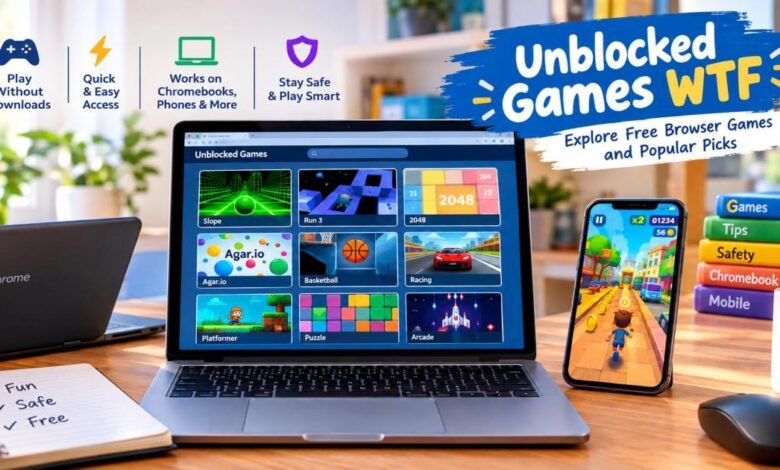
Quick answer: Unblocked games WTF is a name used by several separate websites that list free browser games meant to open on school or work networks. No single official site owns the name. The games run in a browser tab with no download. Popular picks include Slope, Run 3, and 2048.
Type “unblocked games wtf” into a search bar and the results look alike. One page sits on Google Sites. Others sit on GitLab. One has its own domain. All promise free games that load fast and work where other game sites don’t.
So which one is the real unblocked games wtf website? None of them, as far as we can tell. Several unrelated sites use the name, and each runs its own game list. That’s the first thing to know before you click anything.
This guide covers what the name means, how free browser games run, and why schools and workplaces block game sites. It also covers which popular unblocked games are worth a try, and how to judge any site yourself. We built it by reviewing pages that use the name and checking public facts on Flash and school web filters. We could not confirm who runs any of these sites, so we don’t favor one over another.
What Is Unblocked Games WTF?
Unblocked games WTF is a label for browser game sites that try to stay open on locked-down networks. What does “unblocked” mean here? It means a school or office filter hasn’t put the site on its block list yet. The games are ordinary web games. You open a page, click play, and the game loads in the tab.
Many of these pages pitch themselves as unblocked games for school, college, and the workplace. The messy part is ownership, because the name isn’t tied to one owner. You can find it on a Google Sites page, on pages hosted at GitLab, and on a standalone domain.
The numbers don’t match either. One write-up says a site using the name has more than 500 games. Another site using it claims more than 780, updated weekly. Both claims can’t describe one site, which suggests separate projects.
Most pages share the same basic setup. The games run in the browser with no download, and you browse by category or search. Beyond that, expect:
- Free play, usually paid for by ads
- No account on most pages
- A mix of old Flash-era hits and newer HTML5 games
- Simple controls for a keyboard, a mouse, or a touch screen
The “WTF” part has no official meaning that we could find. The FAQs below cover that.
How Do Free Browser Games Run Without a Download?
Your browser does the work. The game files load when you open the page, much like a video loads. Nothing gets installed, which is why no-download games are easy to start and easy to drop.
HTML5 and WebGL in plain words
HTML5 is the modern set of web standards that major browsers understand. It lets a page draw pictures, play sound, and react to your keys or taps. A language called JavaScript runs the game logic inside the tab.
WebGL goes one step further. It lets a page draw 3D scenes by using your device’s graphics chip. That’s how a 3D game like Slope can run in a browser. Game engines such as Unity can also export games that run through WebGL. One page that uses the WTF name says it built its library from HTML5 games and Unity games that don’t need Flash.
Many HTML5 games also work on phones, which is why mobile-friendly browser games are now common.
What happened to Flash games
Years ago, most browser games ran on Adobe Flash. Adobe asked developers to move to HTML5 in 2015, announced a 2020 end date in 2017, and ended support on December 31, 2020. Browsers then removed Flash, and many old games stopped working.
Fans saved a lot of them with Ruffle, a free program that copies how Flash worked. Ruffle is open source, and Newgrounds sponsors it and planned to use it to keep serving its Flash content. The Internet Archive also opened a Flash section that plays hundreds of old games in the browser. i
Ruffle has limits. When it was new, its developers said it couldn’t run most Flash projects made after 2013. A 2026 guide still calls it the usual first choice for old Flash content, though support varies by game.
Today, most browser games without Flash use HTML5. That gives you a quick freshness test. One page that uses the WTF name still says Flash games will stop working in 2020. That date passed years ago. If a page talks about Flash dying “soon,” nobody has updated it in a long time.
Why they load fast on Chromebooks and older laptops
Many simple 2D games typically weigh just a few megabytes, and the browser handles the rest. A Chromebook is built around the Chrome browser, so Chromebook games that live in a tab fit it well.
Schools manage many Chromebooks, so students often can’t install programs. A game that runs in a tab needs no install. One site using the name says its games run on school Chromebooks, work laptops, and phones. Treat that as a sales claim, not a promise.
Speed has limits. 3D games and busy multiplayer games ask more from the chip and the network, so an older laptop may stutter. The gameplay section below has fixes.
Why Do Schools and Workplaces Block Game Sites?
Schools and employers block games to protect the network, keep people focused, and meet safety rules. The reasons differ a bit between a classroom and an office.
How web filters work
A school web filter is software that checks each site you visit against lists and rules. If a site falls into a blocked group, such as games, the page doesn’t load. Schools usually buy this tool from a vendor. Some districts say they use Lightspeed filtering, and others use Securly, a cloud filter that controls access with AI.
In the US, a federal law shapes this. The Children’s Internet Protection Act (CIPA), passed in 2000, requires schools that get E-Rate funding to certify that they follow its rules. Those rules include filters that block obscene images, images that show child sexual abuse, or that harm minors, plus an internet safety policy. The filtering covers school-owned devices, and the policy must include monitoring what minors do online.
Look at what the law targets: harmful images, not games. Schools make their own local choices about filtering, so blocking game sites is usually a school or district decision.
CIPA doesn’t cover workplaces. Employers set their own rules for security, bandwidth, and work time. Some block games outright, and others allow them on breaks.
Why a working link can stop working
Filters change. Vendors update their lists often, and cloud tools that use machine learning can sort sites into groups on their own. A site that opened last week can show a block page today.
Site owners also move domains, take pages down, or lose their hosting. And because so many sites share the unblocked games wtf name, one may load while another is blocked. That doesn’t make the open one safer. It may just not be on a list yet.
What this means for you
- Read the rules. Many school and work policies spell out when games are allowed.
- Play only when it’s allowed. If games are fine on break, play then. If not, wait until you’re home on your own device.
- Skip the workarounds. Tricks to get past a filter can break the rules, and some tools put your data at risk.
- Ask when unsure. A quick question to a teacher or your IT team beats a warning email.
- Remember the monitoring. School devices may log what you visit.
Popular Picks: Free Browser Games to Try
These popular unblocked games show up again and again on sites that use the name. Slope, Run 3, Retro Bowl, Happy Wheels, 1v1.LOL, Smash Karts, Cookie Clicker, and Drift Hunters all appear on pages that use it. We chose games with simple controls and short rounds, so they fit a quick break.

One caution first: the copy of a game on any site may not be the official one. When you can, find the developer’s own page.
| Game | Type | Main controls | Typical round | Best for |
| Slope | 3D endless runner | Left and right keys | 1–3 min | Quick reflex breaks |
| Run 3 | Endless runner | Arrow keys | 3–10 min | Longer runs |
| Moto X3M | Bike stunt racing | Arrow keys | 1–2 min per level | Short levels |
| Retro Bowl | Football game | Mouse or touch | 5+ min | Sports fans |
| Drift Hunters | Car drifting | Arrow keys or WASD | 5+ min | Car fans |
| 2048 | Number puzzle | Arrow keys or swipe | 5–15 min | Calm thinking |
| Cookie Clicker | Idle clicker | Mouse | Short check-ins | Low-effort play |
| 1v1.LOL | Shooter with building | WASD and mouse | About 5 min | Competitive play |
| Shell Shockers | Multiplayer shooter | WASD and mouse | About 5 min | Playing with friends |
| Smash Karts | Kart racing with items | Arrow keys or WASD | 3–5 min | Group fun |
| Happy Wheels | Physics obstacles | Keyboard | 1–3 min | Teens and adults |
Controls and round times are typical and can vary by version.
Quick picks:
- Best for a two-minute break: Slope
- Best for a calm break: 2048
- Best for a longer session: Run 3 or Retro Bowl
- Best with friends: Smash Karts or Shell Shockers
Endless runners: Slope, Run 3, Moto X3M. These endless runner games are easy to learn and hard to put down. In Slope, a ball speeds down a track with no brakes, and any red block or fall ends the run. The track is built fresh each time, so no two runs match. In Run 3, you guide a character through space tunnels and dodge hazards. Moto X3M has you balance a bike over ramps and flips.
Sports and racing: Retro Bowl, Drift Hunters. New Star Games made Retro Bowl, which mixes quick football plays with picking your team. Drift Hunters is a 3D car game about sliding through turns and upgrading your ride.
Puzzle and idle: 2048, Cookie Clicker. In 2048, you slide tiles and merge matching numbers. Gabriele Cirulli released it in 2014. Orteil released Cookie Clicker in 2013. You click a cookie, buy upgrades, and watch the numbers grow. Both suit short bursts.
.io and multiplayer: 1v1.LOL, Shell Shockers, Smash Karts. These. io games put you up against real players online. 1v1.LOL mixes shooting and building. Shell Shockers is an egg-themed shooter. Smash Karts is kart racing with weapons. Some online games include chat, so parents may want to check before a child plays.
Flash-era classic: Happy Wheels. This physics game uses ragdoll characters and shows cartoon gore. It isn’t a fit for young kids, so check age fit first.
Are Unblocked Games WTF Sites Safe?
Are unblocked games safe? No one can say so for certain, and that’s especially true here. The owners are unclear, ad networks change, and a page can change after you check it. You can lower the risk, though.
Common risks
- Pop-ups and misleading ads. Some ads look like game buttons, and a click can open another site.
- Fake download buttons. Browser games don’t need downloads. A button that asks you to get a file is a warning sign.
- Copied games. Some sites can host games without the developer’s permission. That hurts creators, and the copy may be old or altered.
- Empty safety promises. One write-up calls a site using the name malware-free, but a claim isn’t a test.
A 7-point check before you click
- HTTPS. Look for the lock icon and “https” in the address bar. It means the connection is encrypted. It doesn’t prove the site is good.
- No download prompts. A browser game shouldn’t ask you to install anything.
- No sign-in or password requests. Most games need no account. Never reuse a real password.
- Ad load. A few banners are normal. Pop-ups, auto-redirects, and full-screen ads aren’t.
- A contact or copyright page. A site you can reach, or send a takedown notice to, shows some accountability.
- Believable game-count claims. Big numbers with no proof are a warning. So are counts that change between sites, like 500+ on one and 780+ on another.
- Age-fit content. Check that the ads and game themes suit the player’s age.
Red flags
- It asks you to install an extension or app.
- It asks permission to send notifications.
- It redirects you away from the game or opens new tabs on its own.
If you see one, close the tab and don’t click “Allow.” If you already allowed notifications or installed something, remove it in your browser settings and tell an adult or your IT team.
Safer places for free browser games
- The developer’s own site. Many popular games have an official page.
- Major game portals. Well-known portals such as Coolmath Games, Poki, and CrazyGames typically say who runs them. They still show ads, and your school may block them.
- The Internet Archive’s Flash collection. It has a dedicated Flash section that plays old games in the browser through Ruffle.
Stay alert on every site, even these.
Unblocked Games WTF vs. Other Unblocked Game Sites
Unblocked games wtf isn’t one site, so the fair comparison is by type. This table shows typical patterns, not ratings of any single site.
| Factor | WTF-named sites | Google Sites game lists | Major game portals |
| Who runs it | Often unclear | Often unclear | Typically public |
| Ads | Vary; check each page | Vary | Common, with posted policies |
| Game count claims | Big numbers that differ by site | Smaller lists | Counted per game |
| Mobile support | Often claimed | Often limited | Typically strong |
| Update claims | “Weekly” or “regular,” hard to verify | Often slow | Visible release dates |
| Safety statements | Promises with little proof | Rare | Published policies |
Two things stand out. The first is ownership. With most WTF-named sites, you can’t tell who’s behind them, so you can’t judge their track record. The second is freshness. A page still warning about Flash in 2020 shows how little some of these sites change.
So what should you pick? At home, start with the developer’s page or a major portal. If you land on a site that uses the unblocked games wtf name, treat it as a stranger’s site and run the 7-point check.
How to Get Smooth Gameplay on a Chromebook or Phone
Most lag comes from too many tabs, a weak connection, or a heavy 3D game on a small chip. These fixes help:
- Close extra tabs. Each tab uses memory, and games stutter when memory runs low.
- Go fullscreen. Use the game’s fullscreen button, or press F11 on a keyboard.
- Lower the graphics. Some games have a quality setting. 3D games like Slope ask more of the chip.
- Check your connection. Multiplayer IO games need a steady network. Sit closer to the router.
- Keep the browser updated. Updates often fix speed bugs. School Chromebooks usually update on the school’s schedule.
- Turn your phone sideways. Many games play best in landscape. Close other apps first and turn off battery saver.
- Don’t count on saves. Progress may live only in the browser and can vanish if the data is cleared. Cookie Clicker lets you export a save code.
- Use headphones. Sound draws attention fast in a classroom or office.
Who Are These Games Good For?
- People who want a short break. A few minutes of Slope or 2048 fits between tasks.
- Students, when school rules allow it. Think breaks and free periods, or time at home. That’s the safest way to enjoy unblocked games at school.
- Office workers on break time, if the workplace allows games.
- Anyone on an older laptop or a Chromebook. Light games run well on modest hardware.
- Casual players who like simple controls more than long stories.
They’re a weak fit for players who want deep stories, cloud saves, or top-end graphics. They’re also not ideal for young kids playing alone, because of the ads and site risks.
For parents: ask which site your child uses, sit in for a first session, and look at the ads that appear. Set a time limit, steer toward official pages or major portals, and talk about chat in multiplayer games.
Final Thoughts
Unblocked games WTF isn’t one site. It’s a name many sites share, and each has its own owner, game list, and ads. The games are simple, free, and quick to start, but the sites around them vary a lot, and no one can promise any of them is safe.
Pick games with clear controls and short rounds. Run the 7-point check on any site, follow your school or work rules, and use official pages or major portals at home when you can. Then play a quick round of Slope or 2048 and get back to your day.
FAQs
What is unblocked games WTF?
Unblocked games WTF is a name several unrelated websites use for lists of free browser games meant to open on school or work networks. The games run in a browser tab with no download. Popular examples include Slope, Run 3, and 2048. Each site has its own owner and game list.
Is unblocked games WTF one official website?
No. A Google Sites page, GitLab-hosted pages, and a standalone domain all use the name, with different game counts. We could not confirm who runs any of them, so treat each one as a separate site.
Are unblocked games WTF sites safe?
No site can be called safe for certain. Risks include pop-ups, misleading ads, and fake download buttons. Use the 7-point check above, never download files or enter passwords, and close the tab at the first red flag. Official developer sites and major portals are usually a better choice.
Why is “WTF” in the name?
We found no official reason. The pages that use the name don’t explain it. It may be a catchy brand tag or a way to stand out in search results, but that’s a guess. Don’t read anything into it about a site’s content or quality.
Do I need to download anything to play?
No. These games run in your browser. If a site asks you to download a file, add an extension, or install an app, treat that as a red flag and close the page. Real browser games load in the tab and start from there.
Can I play on a phone or Chromebook?
Often, yes. HTML5 games usually run on both, and one site using the name says it supports Chromebooks and phones. Touch controls and speed vary by game, and some play better with a keyboard. A school-managed Chromebook may still block the site.
Why does an unblocked games link stop working?
Filters update their block lists, and sites change domains or go offline. A site that opened last week can be blocked today. Don’t hunt for new links on a school device. If a site you need for class is blocked, ask your teacher or IT team.